


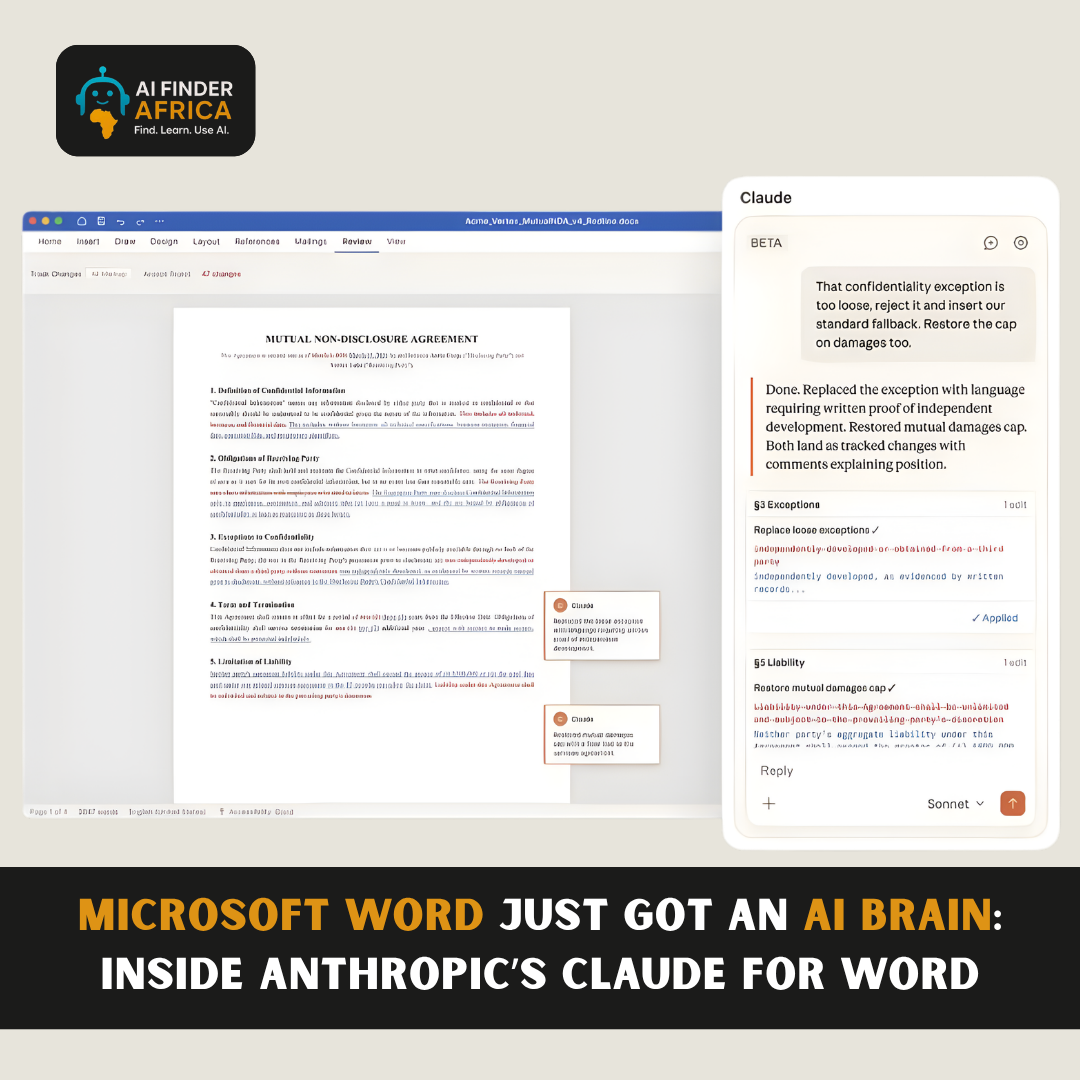
Microsoft Word Just Got an AI Brain: Inside Anthropic’s Claude for Word
There’s a reason most AI tools still feel… disconnected.
You open one tab to write, another tab for AI, copy your text back and forth, fix formatting, then repeat. It works, but it’s clunky.
Now imagine none of that friction exists.
You’re inside Microsoft Word, writing like usual…
but there’s an AI sitting right beside your document, reading, editing, suggesting, and responding in real time.
That’s exactly what Anthropic just introduced with Claude for Word.
And it might quietly become one of the most important upgrades to how people work with documents.
So What Did Anthropic Actually Build?
Claude for Word is an AI integration built directly into Microsoft Word, designed to help users draft, edit, and review documents without ever leaving the app.
But this isn’t just another writing assistant.
It works from a sidebar and interacts with your document as it is, meaning:
- It preserves formatting
- It suggests edits using tracked changes
- It understands full document context
- It responds to prompts based on what you're working on
Instead of acting like a tool you consult, it behaves more like a collaborator embedded in your workflow.
What Makes It Different?
The biggest shift here isn’t what it does, it is how it does it.
Most AI tools operate outside your workspace. Claude moves into it.
You can highlight a section and ask:
- “Does this make sense?”
- “Rewrite this more clearly”
- “Summarise this entire document”
And instead of giving generic responses, it works directly on your file cleanly, contextually, and without breaking structure.
Even better, it can review documents and surface issues, making it useful for things like contracts, reports, memos, academic writing and so on.
It doesn’t just generate text. It thinks through documents.
It Feels Less Like AI… and More Like a Second Brain
What stands out most is how natural it feels.
There’s no jumping between tools.
No messy formatting fixes.
No loss of context.
Everything happens where the work is already happening.
And that changes the experience completely.
Because now, AI isn’t something you use occasionally, it is something that’s always present while you work.
Who Is This Really For?
Claude for Word isn’t just for casual writing. It’s built for people who deal with serious documents daily.
- Professionals working on reports, proposals, and internal documents
- Legal teams reviewing contracts and detailed text
- Students and researchers writing long-form academic work
- Businesses that rely heavily on documentation and communication
Basically, anyone whose work depends on clarity, structure, and accuracy.
Why This Matters
This launch signals a bigger shift in AI.
We’re moving from AI that helps you write faster to AI that helps you think better while writing.
That’s a big difference.
Because writing isn’t just typing, it is structuring ideas, refining arguments, and communicating clearly.
And for the first time, AI is starting to participate in that process in a meaningful way.
Final Thoughts
Claude for Word might look like just another feature update.
But it’s actually something deeper.
It’s AI stepping out of the chat window…
and into the tools people use every single day.
And once that happens, there’s no going back.
Because the moment AI becomes part of your workflow not separate from it everything starts to change.




 Explore